MIDI Designer Pro X: The Legacy Continues

MIDI Designer Pro X: The Legacy Continues

MIDI Designer Pro X was released on NAMM Thursday (January 25, 2024) and is available in 175 countries in English, French, Spanish and Italian.

MIDI Designer Pro X (MDPx) is the culmination of over a decade of relentless iteration. In 2012, we launched MIDI Designer Pro, which we relaunched in 2016 as MIDI Designer Pro 2. MDP2 was critically acclaimed as the only professional-grade MIDI controller built for iOS from the ground up. In that decade, we have released over 80 updates to the App (changelog). Our Community has grown and our library of user-created content covers over 300 MIDI targets from all parts of the music-making world. In 2024, we take a significant leap forward with MDPx: MDPx elevates the user experience to new heights on iPad and Mac, but particularly advances the usability for iPhone users. A new subscription model — Premium — allows even more users to use the App in their music-making and discover MIDI Designer for themselves.


Download MIDI Designer Pro X on the Apple App Store

What’s New

Pricing and Premium versus Free

MIDI Designer has been a one-time purchase since launch in 2012. The sticker price was a bit of a shocker, especially for iPhone users. Before MDPx, users had no way to explore the App for their particular use-case without fully committing. All of this changes with MIDI Designer Pro X.

MIDI Designer Pro X is free to download. Most core and even advanced functionality familiar to MIDI Designer users is available without Premium. Users who wish to take full advantage of MDPx will want to subscribe to Premium. Users can choose to activate Premium for just their platform or for all platforms. Users can subscribe on a monthly or yearly basis, unlocking Premium functionality for:

  • Mac/iPad/iPhone
  • Mac Only
  • iPad/iPhone
  • iPad Only
  • iPhone Only

Here’s the breakdown by feature set:

Feature Without Premium With Premium
Professional-Grade MIDI Controller for iOS & macOS Yes Yes
Controls Types (Knobs, Sliders, XY Pads, etc.) All All
All Connection Types (Wi-Fi, Bluetooth, USB) Yes Yes
Access to Community Layouts Yes Yes
Full MIDI Spec Support Yes Yes
Control Relationships (Supercontrols & Subcontrols) Yes Yes
Superpowers (Ableton Link, Loopers, etc.) Yes Yes
Maximum Number of Controls per Layout Unlimited Unlimited
Maximum Banks/Pages per Layout (iPhone) 1/1 8/48
Maximum Banks/Pages per Layout (iPad) 2/2 8/48
Popup Panels No Unlimited
LED Colors Choices (per Page & Control) No (Basic Green Only) Unlimited
Page Textures and Color Choices No (Default Gray, Basic Texture) Unlimited combinations

Improved iPhone Experience

We’ve overhauled MIDI Designer’s UX on iPhone. This extensive rework greatly expands discoverability, usability and power. iPhone now fully supports portrait orientation and allows for better use of screen real estate.

Most importantly, however, iPhone users can seamlessly use all layouts including those originally designed for iPad and Mac. Users will find that without requiring any adjustment or changes.
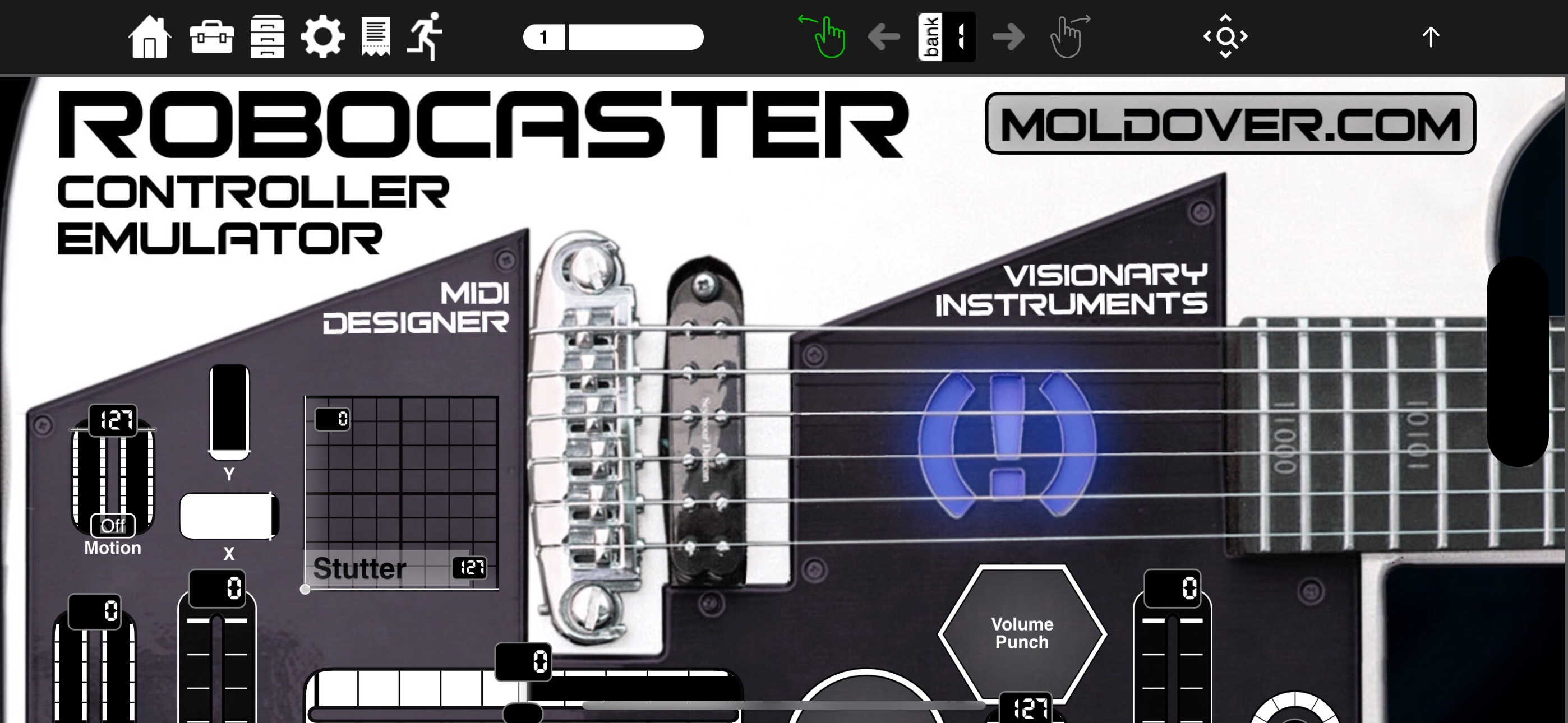
iPad Layout on iPhone Landscape

See this YouTube short for a quick look into iPad layouts on iPhone

For a deeper look at the iPhone interface for MDPx, see this video:


Spaceship Theme and Display Version Options

In MDPx we’ve introduced our first Global Display Version — Spaceship 🛸 — that can be pieced apart and used with other Display Versions. Spaceship contains four toggles — tick marks, numeric indicator, fill, and handle — each of which may be turned on or off. This can be applied to the entire layout and to indivual controls. And what’s more: Control Display Version Options can be applied to the theme for MDP2 — Glow — as well as Classic which we rolled out with the original MIDI Designer Pro. Talk about a reboot!
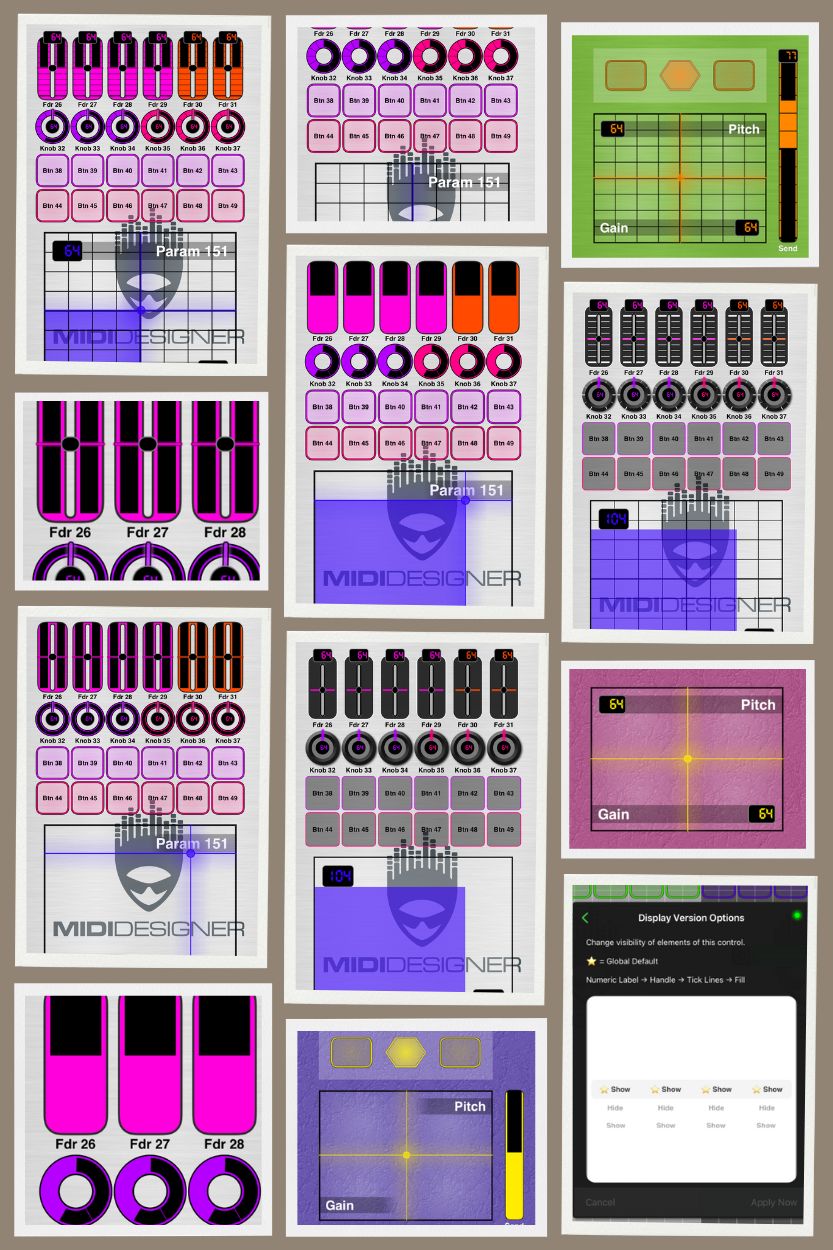
control-display-version-options-collage

Improved File Management

We’ve reworked all file operations on all platforms to allow users to save and load from anywhere in the iOS filesystem without leaving the App. In addition, the Image Manager now has the full Photo library capabilities iOS users expect.

Users also have the ability to resize layouts to portrait or landscape orientations.

New: MIDI Designer Meters

We’ve released MIDI Designer Meters, a new, headless VST/AU. This plug-in sends VU meter RMS or Peak signals back to MIDI Designer via host automation. Unlimited instances in your DAW + the Meter control in MIDI Designer make this a very powerful tool to represent audio feedback in your layout.
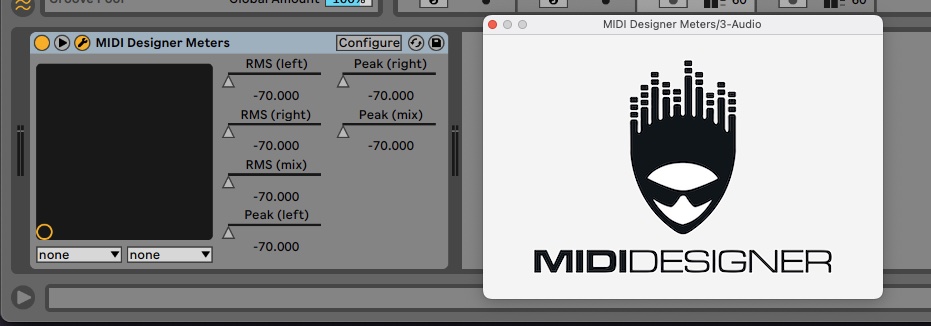
midi-designer-meters

MIDI Designer Meters were created in conjunction with Audiodevs and are available immediately at:

Improved Experience for All Devices

  • Now available for all users without special purchase:
    • Automatic Cloud Backups via Dropbox, now standard for all users.
    • Integration of the Streambyter Plugin is now standard for all users.
    • Addition of Pickers, Image Panels, Custom Images and Meters
  • Behind-the-scenes enhancements to ensure the future viability and support of MD.
  • Lots of UI refinements and fixes that we never got to do to control features and functionalities.


Download MIDI Designer Pro X on the Apple App Store

Elevating the MIDI Designer Legacy

MDPx adopts the legacy of MIDI Designer Pro 2 — enriched by over 12 years of development and 80+ updates — ensuring a seamless transition packed with exclusive MIDI Designer features:

  • Solid MIDI Communications Infrastructure: Over 10 years of development, ensuring reliable and robust MIDI interactions over Network, Bluetooth and USB.
  • Active Community of Authors: A vibrant ecosystem supporting legacy and current music synthesizers, sound engines, DAWs, and all MIDI-controlled devices.
  • Extensive User Layout Library: More than 320 layouts for over 70 manufacturers, contributed by the community.
  • Comprehensive Support: Whether you’re just starting or tackling complex MIDI implementations, with the Community we are here to assist.
  • MIDI Designer’s ‘Superpowers’: A suite of powerful features exclusive to MIDI Designer that we have developed over the last 10+ years. These include:
    • Ableton Link and Link Control Loopers
    • Supercontrols and subcontrols as the basis for many features:
      • Snap sub to value over time
      • Sequential subs
      • Subcontrol chaining
      • Button groups (radio buttons) with Bounceback™
      • Steppers
      • Live Transpose
      • Group Presets
    • Named Ticks
    • Simplified Sysex Messages with variables and bit changers
    • Snap to Value
    • Global Presets
    • Pedalboards
    • Popup Panels (Show/Hide)
    • Enable/Disable Controls
    • Two-up Page Layout for iPad/Mac

MIDI Designer's Superpowers


Download MIDI Designer Pro X on the Apple App Store

Loyalty Benefits

MIDI Designer Pro X values its long-standing user community. As a token of appreciation, legacy users are entitled to special benefits:

Everyone who purchased MIDI Designer Pro 2 prior to our switch to subscription on January 25, 2024 will have lifetime access to all existing features before the 10.0 update.

See What About Me? for more details

What, when, where? Requirements, Release Date and Availability

Compatibility

  • Requires macOS 13.0 or later with Apple Silicon chip.
  • Requires iOS 16.0 or later. Compatible with iPad, iPhone and iPod touch.
  • Available in English, French, Italian and Spanish.

Availability

MIDI Designer Pro X was released in 175 countries on the morning of January 25, 2024, coinciding with the NAMM Winter Show where MIDI itself turned 40. Exciting times!


Download MIDI Designer Pro X on the Apple App Store
MIDI Designer Pro X by Confusion Studios

Update coming to MIDI Designer Pro X Subscription Policy

We have heard your feedback.

We will be updating our subscription policy to honor commitments to prior purchases.

However, Dan is off the grid this weekend and enjoying some time off from the big push for Pro X.

Standby for an update next week. No subscriptions should be charged for prior users before that point as prior users originally had a free year.

Update from Feb 20, 2024

Our users have spoken! We changed policy on this topic as of 2024-02-20: All users who purchased MIDI Designer Pro (2012-2017) or MIDI Designer Pro 2 (2017-2024) prior to our switch to free + subscriptions on January 25, 2024 will have lifetime access to all existing features before the 10.0 update.

This change is already live on the App Store since 10.1.0.

Thanks for your patience and understanding. Please see our official announcement to learn more.

MIDI Designer Pro 2 Version 2.3300 Released

This is our 88th update.

Our Product and Engineering Teams went through the user requests and took no prisoners. Meaning we implemented a lot of stuff.

Enhancements That Make More Things Possible

  • MIDI Message Feedback is now possible: see midiDR.com/qa/9524 for more details
  • Randomize Subcontrol: have any subcontrol switch to a random value on button press
  • Enable/Disable Button midiDR.com/qa/8783: allow a control (or subcontrol) to be turned OFF dynamically
  • Shorter “Snap to Value” times for returning to default or snapping subcontrols to a value (midiDR.com/qa/8908, thanks 5din)
  • Allow for wider labels and add option for bold Multiline labels

Other Enhancements

  • On iPad and iPhone, Swipe Up and Swipe Down will no longer interfere with your performance
  • Mac: lots of enhancements and polish including a fix for the glaring window-size issue
  • iPad: finally, a better fix for 3-dots More-button issue since iPadOS 15. Now swipe-down to access More menu
  • Mac, iPad, iPhone: Open layout from Files menu when App is not open is fixed
  • And many smaller enhancements, fixes and under-the-hood changes prepping for the future of MIDI Designer

More details about the updates in our user manual.

This demo layout walks you through the new features.

12+ years, 88 updates, still going strong, and more to come!

Thanks!

MIDI Designer Team

Happy Holidays & 2022 In Review

Happy Holidays from Confusion Studios

During 2022, we released three major upgrades and several bug fixes

New capabilities and improvements:
– Mac M1 capability, file handling improvements
– Ableton Link integration
– Control “loopers” – adjustable length, reloop, mute
– Transparent panels
– Transparent X-Y pads
– No MIDI Send / Receive control option
– Propagate MIDI min-max changes to Display Min/Max/Ticks
– Log enhancements

More coming in 2023!

Join our conversation on Q&A, Facebook, Instagram, LinkedIn, and Twitter.

#communityPowered #dreamCreatePlay #iosMidi

MIDI Designer and StreamByter

MIDI Designer Pro 2 provides a flexible, customizable MIDI control surface.

StreamByter, by Audeonic, provides processing of a MIDI data stream.

Working together, they provide a complete MIDI processing and control solution.

Example use combinations
– SB decodes a SysEx status dump from target hardware into individual MIDI commands for display in MDP2
– SB remaps MDP2 controls to different target addresses (e.g., one set of controls for part and master effects)
– MDP2 provides control of SB channel cloning / remapping
– SB provides advanced relationships for MDP2 controls

StreamByter is built in to MDP2 as an in app purchase for input and output processing.

For more advanced processing, add the stand alone version of StreamByter, for looping output back to input.

MIDI Fire adds other tools, such as flexible MIDI routing, with multiple StreamByter modules.

See more about StreamByter.

See MDP2 layouts using StreamByter.

If you need help, post your question on our Q&A forum

MIDI Designer Pro 2 for the Transitioning Lemur User

Liine have announced the end of support for the Lemur MIDI / OSC controller application – see liine.net 

MIDI Designer Pro 2 offers the Lemur user an alternate application that supports many of the use cases of Lemur.

Lemur MIDI Designer Pro 2
Control surfaces for MIDI devices – Buttons, knobs, sliders, lists, VU meters, dynamic labels, XY controls, accelerometer
– Eight banks with up to six pages each
– Abstract visual style controls 🟡 – MDP2 focuses more on hardware realistic interfaces, some abstraction possible
Advanced relationships between control settings – programming required – Super / sub control relationships and named ticks provide no-programming implementations for preponderance of controls
– StreamByter for advanced control relationships 
Open Sound Control – MIDI only
Sequencer, Multi-Ball Controls 🟡 – MDP2 does provide control loopers, but no direct sequencing
iOS Supported, M1 Mac Provisional – M1 is provisional, functional, with in-work interface improvements
End of Support – MDP2 continues active development and support, most recent update in July 2022
?  Active application help and user groups – MDP2 has active users, FB group, shared layouts, and developer provided support
? – Library of user shared layouts

There is no conversion capability to convert a Lemur application into a MDP2 layout.  But with MDP2 you can build a layout without any programming – place controls, adjust settings, connect, and take control of your devices.

When advanced control relationships are required:

  • Super / sub control relationships provide basic control interconnection
  • Named ticks provide scaling, arbitrary relationships, control down-sampling, and more, without writing any code
  • StreamByter provides advanced control relationships with straight-forward lexicon

MDP2 is not a one-for-one replacement for Lemur, but can cover many use cases.

Our user group and support team are standing by to help you transition.  

Check out our Q&A site for help and user layouts – midiDr.com/qa/

Join our FaceBook group – https://www.facebook.com/groups/mididesigner

StreamByter is a audeonic.com product, included in MDP2, available stand-alone and in MIDI Fire

MDP2 – a capable SysEx solution for device control

Many current and classic boards provide ability to edit settings via System Exclusive (SysEx) messages.  SysEx provides more data options than Continuous Controller (Cc) or Registered Parameter (RPN/NRPN) messages.  Instead of two MIDI bytes, the data field can be (somewhat) unlimited, allowing for exchange of patch, performance, or even complete system backup.

MDP2 SysEx message format provides for up to four Data bytes, and an extra “channel” byte, for five selectable bytes in a message.

MIDI is already a somewhat non-standard format, since it uses 7 (vice 8) data bits in a message byte.  MDP2 automatically handles conversion from decimal to hex for typical 1 to 4 byte values.  But many manufacturers use even more complicated formats, such as “four bit” encoding (used a lot by Roland), or even somewhat random encoding.  MDP2 has you covered in these cases with “named ticks” – supporting manufacturers completely arbitrary encoding concepts.  In the Roland four-bit per byte case, we can provide a spreadsheet to do the required numerical conversions to load the named ticks.

Many board will have a “transmit edit” setting that will send messages, often SysEx, when edits are done on the board, to keep a MDP2 control layout in sync.  But what if it doesn’t automatically send?  MDP2 can generate the required interrogation messages to obtain status to synchronize the layout.

A board can report data with individual SysEx messages for each parameter, or a longer combined message with multiple values combined.  Each is supported by MDP2.

For individual messages, the board response does not require any translation – with a SysEx address match and MIDI receive enabled, the appropriate control will update.  But, say you need to request 200 parameters, that is a lot of coding.  No problem – a SysEx scanner (https://mididesigner.com/qa/6964) will let just a few controls (typically one for each data byte length) do all the work for you.  (Example – RD-2000, X(m) and RD-88 layouts.)

For a single combined message, the work of separating the single message into individual control messages is done by StreamByter.  Ugh, but now I need to handcraft 200 lines of StreamByter code.  Nope – again, a spreadsheet can automatically generate the needed SB code.  Each situation is slightly different, but we can provide an example if needed to get you started.

Often a manufacturer uses the same SysEx code for a new board, just with different addresses.  In this case an existing layout can be quickly extended to the new board.  But, now you have to change umpteen controls to the new SysEx address format, even though all the data formats are the same.  Nope – SB code can translate the messages in both directions, allowing the layout to be used unchanged with the new hardware.  (Example – some pages in RD-88 editor)

We do have a few limitations.

  • We only process data values up to four bytes, and a fifth “channel” byte.  Again, there are work arounds. One is to have StreamByter compressi data inbound to process, re-expanding outbound.  (Example – eight bytes required to select ZEN-Core waves in X(m) ZEN-Core editor).  Other methods get around the limitation of trying to manipulate a >four byte value range on a single MDP2 control.  Again, using SB, split the inbound data into smaller pieces (say, digits of timecode) for display and control, reassemble on outbound.  Some data may be more amenable to using a section of the data to show/hide controls for the remaining range – an alternate solution to the ZC wave selection problem.
  • We have a current bug where a few specific cases of V and L are not recognized (https://mididesigner.com/qa/9013)
  • We cannot pull out complete patch names for display, or enter patch names, but this in in our think-about pile.  We have several examples of using individual controls (by letter) as a work-around.
  • We do not provide storage for SysEx backup, but MDP2 can be the front end to request patch/performance/board backups to be recorded in a separate SysEx librarian.

MDP2 SysEx controls, supported by named ticks and StreamByter code should be able to handle your most complex board implementations.  If you need help, post a Q&A.

MIDI Designer 2.5: More Tools

Service Release MIDI Designer Pro 2 v2.5.1 is now out. It fixes two minor issues in MDP2 v2.5.
See details in the Change Log.


MIDI Designer Pro 2 v2.5 is coming this Saturday, December 10, 2016 for MDP2*. More tools! We’re adding new features and fixes to make the best MIDI controller experience for iOS even better. It’s a medium-weight upgrade, providing more flexibility for your rig design and editor creation.

Big New Features

  • Movable Panels: put controls on panels, move them around, and even use “make similar.” This feature is very useful as is, and we’ve got big plans for it.

  • Display Zero for Knobs, Sliders and Crossfaders: now the LED ring (knobs) or LED track (sliders/crossfaders) can extend out from any point along its path. Two typical cases are pan knobs (Display Zero is 50% up) and Hammond-organ bars (Display Zero is 100% up). Requires Extra Features Pack to include in a layout; free to use for all.

  • Rotary action for knobs: This is useful to place knobs near the top or bottom of your pages. It also means we’re compatible with gadgets that stick on your screen and rotate, if that’s your thing. Requires Extra Features Pack to include in a layout; free to use for anybody.

Medium-Sized New Features

  • Pedalboards Expose Down: Now you can slide your pages down or up to expose pedalboards. And if you don’t allow pedalboards in Play Mode, they’ll snap shut when you exit Design Mode.
  • Default Value Experience Upgrade: Default Values work properly with Named Ticks, even if your ticks’ MIDI values are out of order (e.g., 5, 127, 2).

Xcode 8, iOS 10

Lots and lots and lots of code changed in the upgrade to iOS 10 (Swift 3 and Xcode 8). See something, say something! Please report all bugs to wtf [at] mididesigner.com

Fixes

  • Fixed: Now no MIDI values are sent on MIDI Designer start, layout load, page load, nor reset to default template (Config -> Actions -> New)
  • Fixed: Default values for named ticks
  • Fixed: Bluetooth popup bug for iPhone introduced in 2.4.6
  • Fixed: Smaller bugs, and lots of under-the-hood improvements to make MD even better.

*For existing users of MIDI Designer Limited and MIDI Designer Lite, it’s going to be coming in the middle of next week.