MIDI Designer Pro X: The Legacy Continues

MIDI Designer Pro X: The Legacy Continues

MIDI Designer Pro X was released on NAMM Thursday (January 25, 2024) and is available in 175 countries in English, French, Spanish and Italian.

MIDI Designer Pro X (MDPx) is the culmination of over a decade of relentless iteration. In 2012, we launched MIDI Designer Pro, which we relaunched in 2016 as MIDI Designer Pro 2. MDP2 was critically acclaimed as the only professional-grade MIDI controller built for iOS from the ground up. In that decade, we have released over 80 updates to the App (changelog). Our Community has grown and our library of user-created content covers over 300 MIDI targets from all parts of the music-making world. In 2024, we take a significant leap forward with MDPx: MDPx elevates the user experience to new heights on iPad and Mac, but particularly advances the usability for iPhone users. A new subscription model — Premium — allows even more users to use the App in their music-making and discover MIDI Designer for themselves.


Download MIDI Designer Pro X on the Apple App Store

What’s New

Pricing and Premium versus Free

MIDI Designer has been a one-time purchase since launch in 2012. The sticker price was a bit of a shocker, especially for iPhone users. Before MDPx, users had no way to explore the App for their particular use-case without fully committing. All of this changes with MIDI Designer Pro X.

MIDI Designer Pro X is free to download. Most core and even advanced functionality familiar to MIDI Designer users is available without Premium. Users who wish to take full advantage of MDPx will want to subscribe to Premium. Users can choose to activate Premium for just their platform or for all platforms. Users can subscribe on a monthly or yearly basis, unlocking Premium functionality for:

  • Mac/iPad/iPhone
  • Mac Only
  • iPad/iPhone
  • iPad Only
  • iPhone Only

Here’s the breakdown by feature set:

Feature Without Premium With Premium
Professional-Grade MIDI Controller for iOS & macOS Yes Yes
Controls Types (Knobs, Sliders, XY Pads, etc.) All All
All Connection Types (Wi-Fi, Bluetooth, USB) Yes Yes
Access to Community Layouts Yes Yes
Full MIDI Spec Support Yes Yes
Control Relationships (Supercontrols & Subcontrols) Yes Yes
Superpowers (Ableton Link, Loopers, etc.) Yes Yes
Maximum Number of Controls per Layout Unlimited Unlimited
Maximum Banks/Pages per Layout (iPhone) 1/1 8/48
Maximum Banks/Pages per Layout (iPad) 2/2 8/48
Popup Panels No Unlimited
LED Colors Choices (per Page & Control) No (Basic Green Only) Unlimited
Page Textures and Color Choices No (Default Gray, Basic Texture) Unlimited combinations

Improved iPhone Experience

We’ve overhauled MIDI Designer’s UX on iPhone. This extensive rework greatly expands discoverability, usability and power. iPhone now fully supports portrait orientation and allows for better use of screen real estate.

Most importantly, however, iPhone users can seamlessly use all layouts including those originally designed for iPad and Mac. Users will find that without requiring any adjustment or changes.
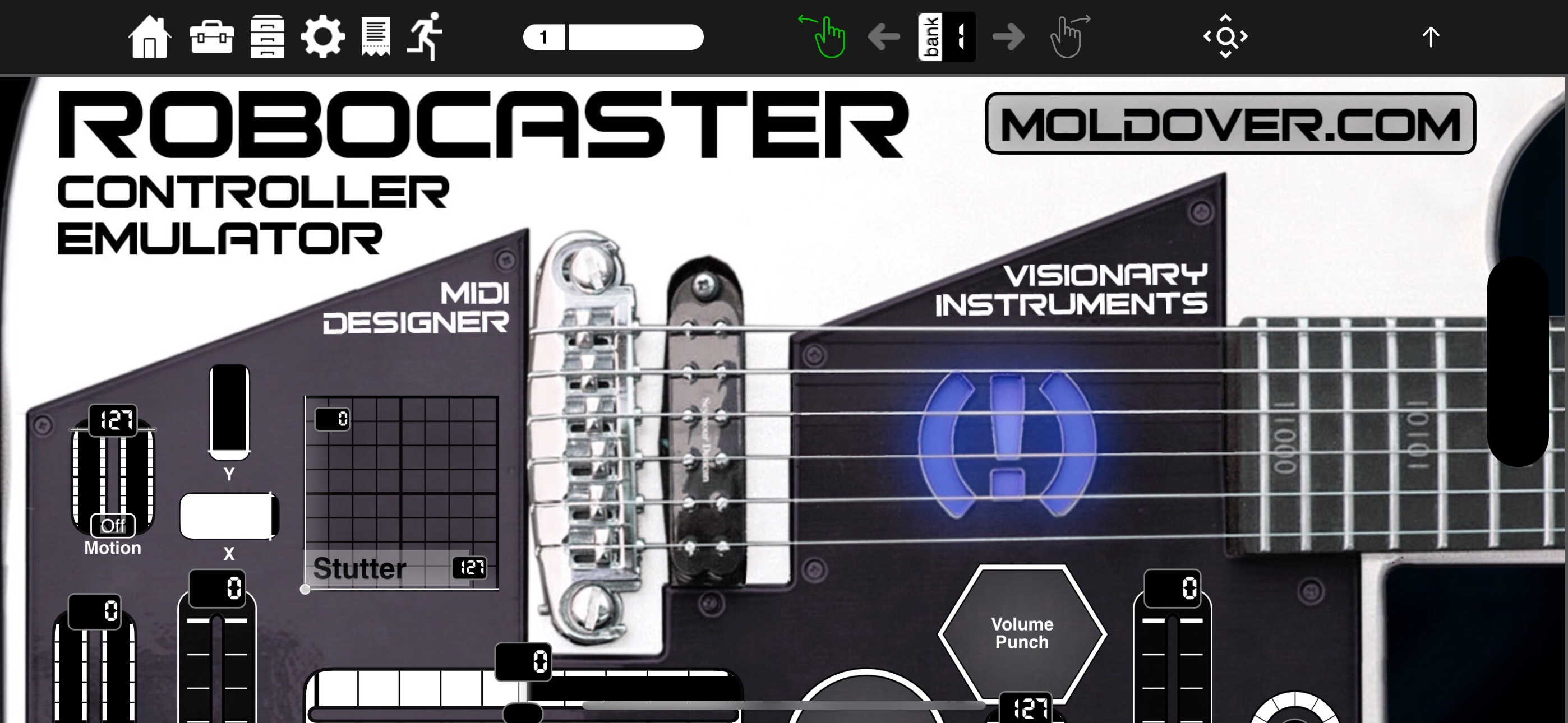
iPad Layout on iPhone Landscape

See this YouTube short for a quick look into iPad layouts on iPhone

For a deeper look at the iPhone interface for MDPx, see this video:


Spaceship Theme and Display Version Options

In MDPx we’ve introduced our first Global Display Version — Spaceship 🛸 — that can be pieced apart and used with other Display Versions. Spaceship contains four toggles — tick marks, numeric indicator, fill, and handle — each of which may be turned on or off. This can be applied to the entire layout and to indivual controls. And what’s more: Control Display Version Options can be applied to the theme for MDP2 — Glow — as well as Classic which we rolled out with the original MIDI Designer Pro. Talk about a reboot!
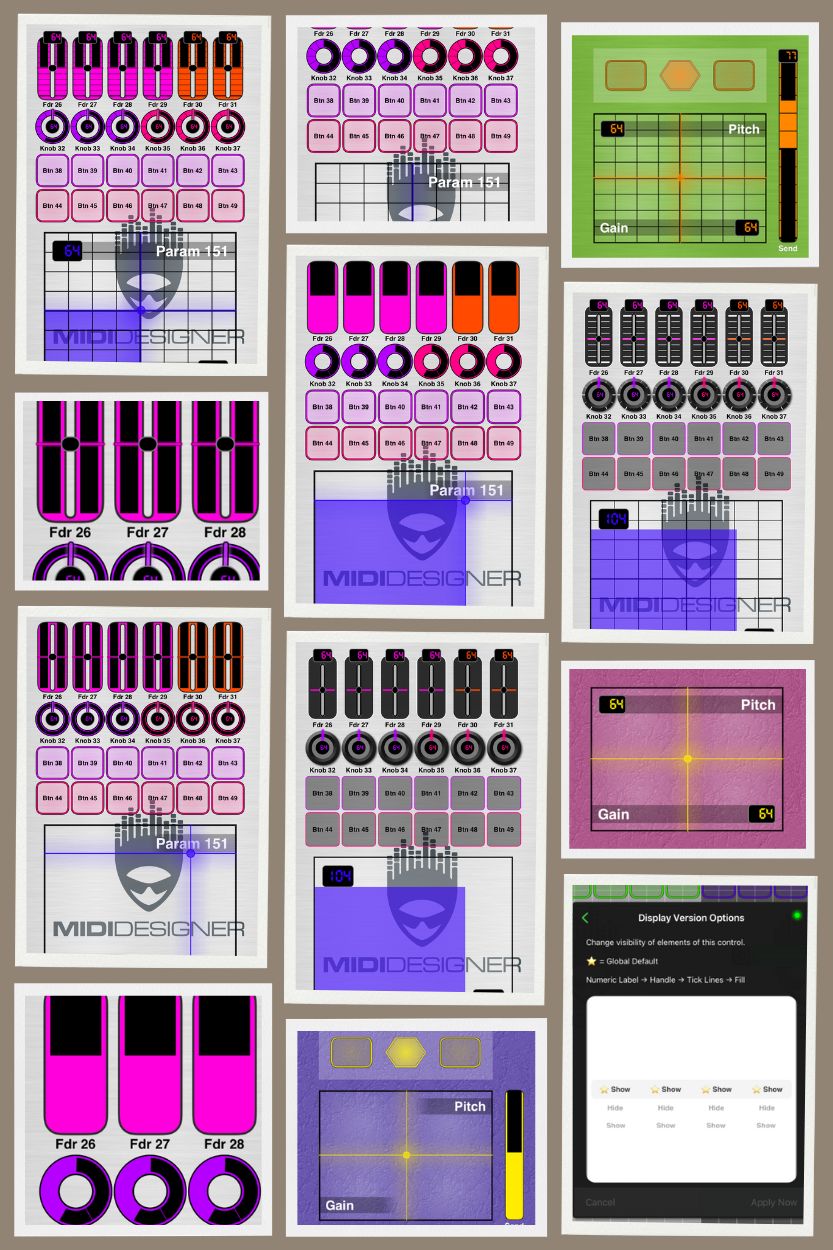
control-display-version-options-collage

Improved File Management

We’ve reworked all file operations on all platforms to allow users to save and load from anywhere in the iOS filesystem without leaving the App. In addition, the Image Manager now has the full Photo library capabilities iOS users expect.

Users also have the ability to resize layouts to portrait or landscape orientations.

New: MIDI Designer Meters

We’ve released MIDI Designer Meters, a new, headless VST/AU. This plug-in sends VU meter RMS or Peak signals back to MIDI Designer via host automation. Unlimited instances in your DAW + the Meter control in MIDI Designer make this a very powerful tool to represent audio feedback in your layout.
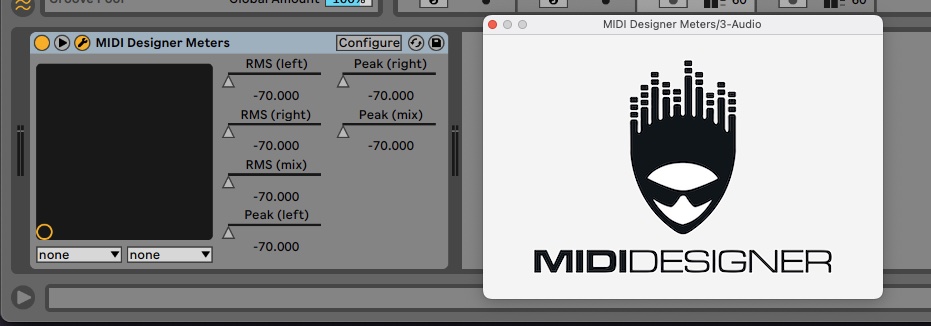
midi-designer-meters

MIDI Designer Meters were created in conjunction with Audiodevs and are available immediately at:

Improved Experience for All Devices

  • Now available for all users without special purchase:
    • Automatic Cloud Backups via Dropbox, now standard for all users.
    • Integration of the Streambyter Plugin is now standard for all users.
    • Addition of Pickers, Image Panels, Custom Images and Meters
  • Behind-the-scenes enhancements to ensure the future viability and support of MD.
  • Lots of UI refinements and fixes that we never got to do to control features and functionalities.


Download MIDI Designer Pro X on the Apple App Store

Elevating the MIDI Designer Legacy

MDPx adopts the legacy of MIDI Designer Pro 2 — enriched by over 12 years of development and 80+ updates — ensuring a seamless transition packed with exclusive MIDI Designer features:

  • Solid MIDI Communications Infrastructure: Over 10 years of development, ensuring reliable and robust MIDI interactions over Network, Bluetooth and USB.
  • Active Community of Authors: A vibrant ecosystem supporting legacy and current music synthesizers, sound engines, DAWs, and all MIDI-controlled devices.
  • Extensive User Layout Library: More than 320 layouts for over 70 manufacturers, contributed by the community.
  • Comprehensive Support: Whether you’re just starting or tackling complex MIDI implementations, with the Community we are here to assist.
  • MIDI Designer’s ‘Superpowers’: A suite of powerful features exclusive to MIDI Designer that we have developed over the last 10+ years. These include:
    • Ableton Link and Link Control Loopers
    • Supercontrols and subcontrols as the basis for many features:
      • Snap sub to value over time
      • Sequential subs
      • Subcontrol chaining
      • Button groups (radio buttons) with Bounceback™
      • Steppers
      • Live Transpose
      • Group Presets
    • Named Ticks
    • Simplified Sysex Messages with variables and bit changers
    • Snap to Value
    • Global Presets
    • Pedalboards
    • Popup Panels (Show/Hide)
    • Enable/Disable Controls
    • Two-up Page Layout for iPad/Mac

MIDI Designer's Superpowers


Download MIDI Designer Pro X on the Apple App Store

Loyalty Benefits

MIDI Designer Pro X values its long-standing user community. As a token of appreciation, legacy users are entitled to special benefits:

Everyone who purchased MIDI Designer Pro 2 prior to our switch to subscription on January 25, 2024 will have lifetime access to all existing features before the 10.0 update.

See What About Me? for more details

What, when, where? Requirements, Release Date and Availability

Compatibility

  • Requires macOS 13.0 or later with Apple Silicon chip.
  • Requires iOS 16.0 or later. Compatible with iPad, iPhone and iPod touch.
  • Available in English, French, Italian and Spanish.

Availability

MIDI Designer Pro X was released in 175 countries on the morning of January 25, 2024, coinciding with the NAMM Winter Show where MIDI itself turned 40. Exciting times!


Download MIDI Designer Pro X on the Apple App Store
MIDI Designer Pro X by Confusion Studios

MIDI Designer 2.9 Announced!

New York, NY – May 13, 2017 — Confusion Studios announced MIDI Designer Pro 2 v2.9, which will be available for download from the Apple App Store on Saturday, May 20, 2017.

This new version brings greater maturity and stability along with new features for builders to work more efficiently during initial layout build and subsequent revisions of layouts.

NEW FEATURES

Panel Grouping and Panel Channel — Panels can now be used to group controls. This behavior is optional. Panels can also be assigned a Channel and/or CC Offset for member controls, allowing users to build and modify pages and layouts quickly in a modular fashion.

Timing Rework — In addition, Snap to Value (and Snap to Default Value) have gotten reworked to allow for smaller timings and more frequent MIDI-value sends.

More MIDI — New on the MIDI side for 2.9:

  • Song Select MIDI message (for interaction with Songbook)
  • 4-byte device ID Roland Sysex Checksum (for the Roland Boss GP-10).

FIXED ISSUES

Dozens of issues — some notable, some minor — have been fixed in 2.9. See the Change Log for more information.

NEW WATERMARK

MIDI Designer Pro 2.9 is the 45th update of MIDI Designer since launch in 2012. MIDI Designer Author and Confusion Studios CEO Dan Rosenstark notes, “This release brings additional coherence and stability to an already mature platform that users trust and love. But it’s Panel Grouping and Panel Channel that are most exciting. Musicians, lighting users and others tweak and refine their layouts over months and even years. These panel features facilitate fast workflow and allow users to organize complex layouts easily. Let’s see what users do with it!”

The MIDI Designer Community provides a multitude of layouts for popular MIDI hardware and software targets. Those that have been rated by the MIDI Designer Team can be seen here.

ABOUT MIDI DESIGNER

Released by Confusion Studios LLC in 2012, the award-winning MIDI Designer Pro 2 has been lauded by Music Industry publications and used on stage and in the studio by world-class musicians, producers and DJs around the World. MD boasts a large Community of users creating and sharing virtual MIDI controllers for a multitude of different MIDI targets. Used by everyone from VJs to robotics experts, MD has also recently made inroads into television and film in both lighting design and camera control.

MIDI Designer Pro 2 will run on any iPad, iPhone or iPod touch running iOS 9.3 or later. The standalone, dedicated versions of MIDI Designer all require an iPad running iOS 9.3 or better.

Visit midiDesigner.com for further details.

iPad and iPhone MIDI Controllers for the Yamaha reface CS by Ibo Kai

Most MIDI Designer layouts are for iPad, and few have been ported to iPhone. Ibo Kai has broken this rule with his new layout for the Yamaha reface CS [ see all of Ibo Kai’s layouts ]

iPad Controller for Yamaha reface CS Screen #1

iPad Controller for Yamaha reface CS Screen #2

iPad Layout, Author’s Notes: Remote Editor for Yamaha Reface CS

To avoid the complicated procedure for system settings in Reface CS (switch off, press + hold a certain key – remember which key to use for which function -, switch on again) I made this layout for quickly and easily changing things. Because they are all controllable via MIDI sysex! I can switch the internal speakers on and off, engage or disengage local control, change the pitch bend range etc. remotely from the iPad. Additionally I added two (green) buttons at the top for what I use most often: switching on both the internal speakers and local control, when I want to play Reface on its own, or switch both off, whenever I play it via my DAW.

This layout is based on Reface firmware 1.30, which introduced a number of new functions: for example in the looper you can now switch between the Guide Sound (currently set sound) or a Click Sound. Furthermore you can quantize your recordings to either 8th or 16th notes. Naturally if your firmware is older, you will not be able to control these, however the other controls should still work fine.

The second page is doubling the Reface onboard sliders for setting the sound. This is simple MIDI CC and I added it mainly for use when I want to record changes on the PC, while the synth is out of reach of my hands.

[ iPad Layout on Our Q&A Site ]

iPhone Layout, Author’s Notes: Reface CS System Editor for iPhone

I made another version of the Reface CS editor for my iPhone. The layout is slightly different due to the small screen. Also I skipped the second page, the sound controls would´t really make sense in this size. Apart from that it´s all there, including the two additional buttons I made for quickly changing according to the playing situation: locally with local control and speakers on and playing via DAW, with local off and speakers off. Now I can use my iPhone for quick changes of system settings even when my iPad is away, busy with other things.

iPad Controller for Yamaha reface CS Screen #2

[ iPhone Layout on Our Q&A Site ]

Confusion Studios Announces Dedicated MIDI Controllers for the Yamaha Reface DX for iPad

Two new, standalone iPad editions of the award-winning professional MIDI controller platform bring MIDI control to the Reface DX

Update March 7, 2017: MDDX1 and MDDX2 are now live on the App Store.

New York, NY – February 14, 2017 – Confusion Studios announced two new MIDI controller apps for iPad, both of which will be available for download from the Apple App Store on Wednesday, March 1, 2017: MDDX1 and MDDX2.

Both of the new apps are MIDI controllers for the Yamaha Reface DX. Yamaha released the Reface DX – a portable, FM-synthesis-based keyboard – in 2015 to critical acclaim. Each of the new apps is based on a user-created layout for MIDI Designer Pro 2; each has a unique approach to controlling the Reface DX.

The Editor: MDDX1 by Helfried

MDDX1: Voice Editor for Yamaha Reface DX by Helfried Wildenhain highlights this user-author’s eye for design, a deep attention to detail, and a desire to push the underlying platform – MIDI Designer Pro 2 – to do new things. It allows for control of every parameter on the Reface DX and provides surprising new control vistas. The App extends the reface DX’s interface, providing a much-needed algorithms display, Master Tune, Transpose, Randomize and other new sections.

[ MDDX1: Voice Editor for Yamaha Reface DX by Helfried Wildenhain Layout for MDP2 on Community Site ]

MDDX1 will run on any iPad with iOS 9.3 or better, and will be available on March 1, 2017 for download for $9.99. The app purchase may be applied towards a bundle purchase including MIDI Designer Pro 2.

MDDX1: Voice Editor for Yamaha Reface DX by Helfried Wildenhain

MDDX1: Voice Editor for Yamaha Reface DX by Helfried Wildenhain

Performance Tool: MDDX2 by Ibo Kai

MDDX2: Performance Tool for Reface DX by Ibo Kai is an additional, performance- focused interface for the Reface DX. As the author of the layout puts it, “This layout is pretty simple, just one page shows all the available functions. It is mainly what you find in the ‘FM’ keypad of the synth: frequencies, levels and feedback settings separately per operator plus the algorithm select.” In addition, Ibo Kai added an Amp Mode section. This auxiliary controller for the Reface DX is intended for live and studio performance, where a full-blown editor is not practical.

[ MDDX2: Performance Tool for Reface DX by Ibo Kai Layout for MDP2 on Community Site ]

MDDX2 will run on any iPad with iOS 9.3 or better, and will be available on March 1, 2017 for download for $3.99. The app purchase may be applied towards a bundle purchase including MIDI Designer Pro 2.

MDDX2: Performance Tool for Reface DX by Ibo Kai

MDDX2: Performance Tool for Reface DX by Ibo Kai

Two New Standalone, Dedicated Apps

MIDI Designer Author and Confusion Studios CEO Dan Rosenstark notes, “Both editors show the layout authors – Helfried and Ibo Kai – flexing design muscle and pushing the MIDI Designer platform to work in new ways. Each is a dedicated tool for working with the Reface DX and each provides a surprising and useful new interface for this small keyboard. Additionally, both provide new users with an entry point into the MIDI Designer platform at a low price.”

MDDX1 and MDDX2 join the four existing standalone MIDI Designer apps for dedicated control: MIDI Designer XW: Casio XW Solo Synth Controller, MD77: Voice Editor for Yamaha SY77/TG77 by Ibo Kai, MDClav: Clavinova Controller by Craig Knudsen and MDXG: XG Sound Set Controller by Craig Knudsen.


About MIDI Designer

Released by Confusion Studios LLC in 2012, the award-winning MIDI Designer Pro 2 has been lauded by Music Industry publications and used on stage and in the studio by world-class musicians, producers and DJs around the World. MD boasts a large Community of users creating and sharing virtual MIDI controllers for a multitude of different MIDI targets. Used by everyone from VJs to robotics experts, MD has also recently made inroads into television and film in both lighting design and camera control.

MIDI Designer Pro 2 will run on any iPad, iPhone or iPod touch running iOS 9.3 or later. The standalone, dedicated versions of MIDI Designer all require an iPad running iOS 9.3 or better.

Visit midiDesigner.com for further details.

Post-NAMM Announcement: Confusion Studios Announces MIDI Designer Pro 2 v2.8

Latest iteration of the award-winning professional MIDI controller platform brings side-by-side multitasking, pan-and-zoom and portrait mode to the iPad

Anaheim, CA – Confusion Studios announced version 2.8 of MIDI Designer Pro 2 (MDP2) will be available for download from the Apple App Store for iOS on Wednesday, February 1, 2017.

Since MIDI Designer Pro launched in 2012, MIDI Designer users have been creating and sharing layouts to control other music-making apps on iPad. Side-by-side multitasking brings this experience to the next level, allowing users to see and manipulate a controller in MDP2 alongside MIDI-target apps.

MIDI Designer Author and Confusion Studios CEO Dan Rosenstark commented, “Half the story we know about side-by-side multitasking: Users have already shared layouts for many iOS apps, including Animoog, Galileo, and Loopy HD. They will control these apps better – and make new, better controllers – thanks to side-by-side multitasking. The other half of the story is about what’s next: our users will discover and share other use-cases for side-by-side multitasking. That real-world feedback is always exciting. Also, the inclusion of portrait mode in this release fulfills one of our most-popular user requests.”

Slide Over, Split View and Portrait

Slide Over: MDP2 v2.8 lets iPad users take advantage of Slide Over. While not every app can be slid-over app, Slide Over can work with all other iPad apps. With Slide Over, users can make changes to their MIDI Designer layout without leaving another app. Slide Over works on most iPads: iPad Pro, iPad Air and later, and iPad mini 2 and later.
Split View: Split View allows for true, shared-screen multitasking with MDP2 v2.8. New controllers will be possible for music-making apps that support this feature, including Infinite Looper, Frobulator, Metarecorder, VoiceRack, and Thumbjam. By combining multiple apps in one controller, users can view one app in Split View while controlling several others (including apps that do not yet support Split View). Beyond apps for music, it can be used with compatible apps for reading, writing and communicating. Split View works on newer iPads: iPad Pro, iPad Air 2, or iPad mini 4.
Portrait Mode: MDP2 v2.8 brings the powerful two-up page to a vertical orientation. This is especially useful for use in conjunction with apps that tend to be used in a portrait mode (like forScore) and physical spaces and stands where the iPad will not fit in landscape.
Pan and Zoom: This pair gives users greater flexibility in managing their screen real estate. Zoom lets users move between several magnification modes: fit width, original and fit half-width. Four-button pan provides scrolling, which is particularly useful where part of the view is obscured by the magnification level or side-by-side multitasking.

MDP2 v2.8 + Frobulator

MDP2 v2.8 + Frobulator

MDP2 v2.8 + Infinite Looper

MDP2 v2.8 + Infinite Looper

MDP2 v2.8 + Metarecorder

MDP2 v2.8 + Metarecorder

MDP2 v2.8 + Frobulator

MDP2 v2.8 + Frobulator

Press Contact

Dan Rosenstark, Author & CEO
Email: dan [at] midiDesigner [dot] com

About MIDI Designer

Released by Confusion Studios LLC in 2012, the award-winning MIDI Designer Pro 2 has been lauded by Music Industry publications and used on stage and in the studio by world-class musicians, producers and DJs around the World. MD boasts a large Community of users creating and sharing virtual MIDI controllers for a multitude of different MIDI targets. Used by everyone from VJs to robotics experts, MD has also recently made inroads into television and film in both lighting design and camera control.

MIDI Designer Pro 2 will run on any iPad, iPhone or iPod touch running iOS 9.3 or later.

Visit midiDesigner.com for further details.

MIDI Patcher for OSX?

Need a MIDI Patchbay (Router) for macOS (OS X)?

Options Include:

MIDI Designer 2.5: More Tools

Service Release MIDI Designer Pro 2 v2.5.1 is now out. It fixes two minor issues in MDP2 v2.5.
See details in the Change Log.


MIDI Designer Pro 2 v2.5 is coming this Saturday, December 10, 2016 for MDP2*. More tools! We’re adding new features and fixes to make the best MIDI controller experience for iOS even better. It’s a medium-weight upgrade, providing more flexibility for your rig design and editor creation.

Big New Features

  • Movable Panels: put controls on panels, move them around, and even use “make similar.” This feature is very useful as is, and we’ve got big plans for it.

  • Display Zero for Knobs, Sliders and Crossfaders: now the LED ring (knobs) or LED track (sliders/crossfaders) can extend out from any point along its path. Two typical cases are pan knobs (Display Zero is 50% up) and Hammond-organ bars (Display Zero is 100% up). Requires Extra Features Pack to include in a layout; free to use for all.

  • Rotary action for knobs: This is useful to place knobs near the top or bottom of your pages. It also means we’re compatible with gadgets that stick on your screen and rotate, if that’s your thing. Requires Extra Features Pack to include in a layout; free to use for anybody.

Medium-Sized New Features

  • Pedalboards Expose Down: Now you can slide your pages down or up to expose pedalboards. And if you don’t allow pedalboards in Play Mode, they’ll snap shut when you exit Design Mode.
  • Default Value Experience Upgrade: Default Values work properly with Named Ticks, even if your ticks’ MIDI values are out of order (e.g., 5, 127, 2).

Xcode 8, iOS 10

Lots and lots and lots of code changed in the upgrade to iOS 10 (Swift 3 and Xcode 8). See something, say something! Please report all bugs to wtf [at] mididesigner.com

Fixes

  • Fixed: Now no MIDI values are sent on MIDI Designer start, layout load, page load, nor reset to default template (Config -> Actions -> New)
  • Fixed: Default values for named ticks
  • Fixed: Bluetooth popup bug for iPhone introduced in 2.4.6
  • Fixed: Smaller bugs, and lots of under-the-hood improvements to make MD even better.

*For existing users of MIDI Designer Limited and MIDI Designer Lite, it’s going to be coming in the middle of next week.