Here is my first attempt at a layout and a share. It is for the Line 6 POD X3 Live guitar effects processor. It was based on the other Layout by fdesnoyers, but it has been modified significantly.
It is set up on the one Big page format, so the pages switch in tandem. That can be turned off though. Most midi is sent over channel 1, the AMP 2 settings are sent on the next consecutive channel via the pod, so, they are on channel 2.
Page 1: X3 Live
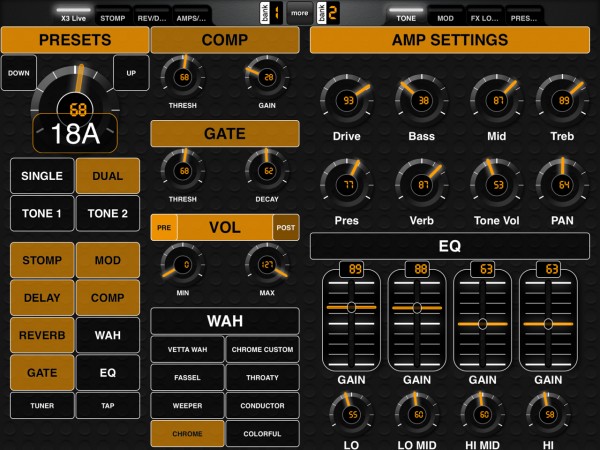
This page was designed to allow for quick selection of presets on the POD. The knob in the upper left allows for quick scrolling through the Presets 1A, 1B, 1C, etc and uses named ticks to display the patch location. Up and down buttons allow for stepping through presets as well. Below that are buttons that replicate the footswitches on the POD. Some knobs have been added for Comp, Gate, and Vol min/max since they are global commands. On the right hand page, you'l find Amplifier settings. Depending on the position of the Tone one and Tone toggle, you can control the Amplifier settings for each amp independently. Below that is an EQ section that duplicates the Parametric EQ. Tapping on the EQ title itself toggles it on and off (same goes for the Gate and the comp on the left. If you place two fingers just under the tuner and tap buttons and slide up to reveal the "pedal board" You'll find buttons for the 20 mididesigner global presets.
Page 2: Stomp/Mod
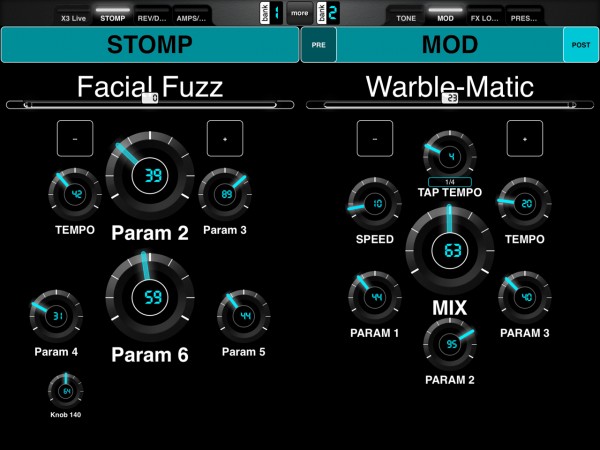
Stomp and MOD titles are actually toggle buttons and turn on/off the effects. Pre/Post toggles are on the Mod title bar. The Mod Button was sent to the back, so the pre/post buttons could be selected over the MOD toggle. Just under the title is a squashed down slider displaying named ticks. You can drag left to right by placing your finger on the slider and named ticks display the effects selected on release. Below that to the left and right are +/- toggles for stepping through effect models. Then below that are the knobs available for modifying the effect. Persistent names were used where available, but in general, they follow the order displayed in the effect edit window on the pod. So, you can double tap the MOD/Stomp button on the POD itself, then watch the knobs turn on the parameters. Once dialed in, you can simply tap the save button on the POD to commit the changes to the POD.
Page 3: Reverb/Delay and the FX Loop
This page has similarly configured toggles, sliders and parameters as the previous page. On the right are controls for the FX Loop ( I don't use this myself, just made it available, so I have not tested it.

Page 4: AMPS/Cabs/Mics & Global Presets
The last page has slider selectors for the AMP/CAB and Mic models. Up and down toggles have been provided for stepping through the named tick for each. Knobs have been added for bypass and room controls for the mics. On the right hand are toggles for the 20 mididesigner global presets. Looking at it now, I probably should put the Tone1 and tone 2 toggles here as well, that way you can toggle to the amp1/amp2 and then change the amp, cab, or mic for each.

The overall purpose in making this was to make a layout that was easy to read with larger easy to use controls. I use it so that I don't have to bend over for tweaking patches. I can make the changes on the ipad, they are sent to the POD in real time and then if I want to save the edits, I can simply hit the save button on the POD with my foot.
Challenges still:
I'm using the iRig Midi connector and have also tried the M-Audio Uno through my laptop. I have issues with the supercontrol toggles when I have both the midi in and midi out connected to the POD. So, for example, the amp selector freaks out and rapidly cycles through the amp models in a loop if both midi in and out are connected, but this stops if the midi out on the POD is disconnected.
As a result, changing presets with your foot on the POD works, but the parameters aren't sent to the mididesigner layout to update the display. So, you can think you have parameters set one way and they are not. You can still edit them since the controlls work in "Pickup" mode.
So, bidirectionality is a problem for my layout.
Another issue that I believe is being worked on is named presets for groups of controls. This would allow the user to save presets with a name for individual effect settings, So, I could try to dulpicate eddie's flanger and save that effect group as a preset. It would also be good if you could save named presets for all controls. This would allow the user to essentially save POD patches in Mididesigner, making naming them much easier and expanding the number of named presets you could have by using the mididesigner ones as off devise storage of presets.
So, It is a work in progress. I can't really provide support for this, so if you have a problem, you are mostly on your own. If you find a problem and can fix it, send the fix to the comments so all users can benefit. Same goes for ideas and suggestions.
Thanks,
JP
Here is a link to the Layout
