LINE6 POD HD500
I've been using MIDI Designer for some time and with this wonderful tool, I finally found a way to control my LINE6 gears from my iPad without having to spend days trying to understand how the tool works.
Here is layout I've built for LINE6 POD HD500. Layout is based on latest release of MD 1.6.0 and LINE6 HD500 Firmware (V 2.20).
-
POD HD500 Controls.
-
Not so many controls via MIDI compared to the range of parameters in POD X3 LIVE.
-
HD series is very different from other POD series; maybe that's why there are not so many controls (amps, effects, etc.) you can drive with MIDI commands.
-
I'm using MIDI channel “1” for HD500, You can change channel assignment with just one click (refer to MIDI Designer User Guide) but if you use your HD500 with a DT50 amp, leave it to “1” as DT50 will only listen to MIDI channels 1 and 2.
-
Foot TAP Tempo, I use 2 buttons:
-
1 Toggle button to set "tempo" (what else...). You need to tap twice. Time between ON and OFF state will determine tempo speed.
-
1 Momentary button set as SUPERCONTROL for Toggle button. I use this one to set "fast tempo" more easily.
Having to rely on aside reference grid to remember which pre-set I have to select to load song setup was not very pleasant. I decided to reproduce most of SETLIST panels on pages. Sequence is very simple:
-
Select you pre-set list (e.g. My Songs DT50) if not already selected.
-
Select pre-set.
To ease pre-set selection, I built a grid based on HD500 Edit pre-set numbering schema. I also set "LED color" to RED (256) for undefined pre-sets but you can select any color you like.

NEW PAGE BANK for setlist.
Thanks to new STORE and RECALL feature, I added new PAGE BANK for live set lists. Each sound pre-set can be recalled by using KNOB and select song title et press RECALL button to activate desired BANK/PRESET.
With this feature, I can recall both BANK and PRESET with just one push on a button, which ease switching from one sound to another.
When creating this control, make sure to place BANK SELECT SubControl first in SubControl list as it must be specified prior to selecting song pre-set SubControl as set list can be based on multiple BANK.
Whis thi featire, I don't have to show HD layouts and focus on selcting songs presets and tweaking (if required)DT50 amplifier parameters on the fly.
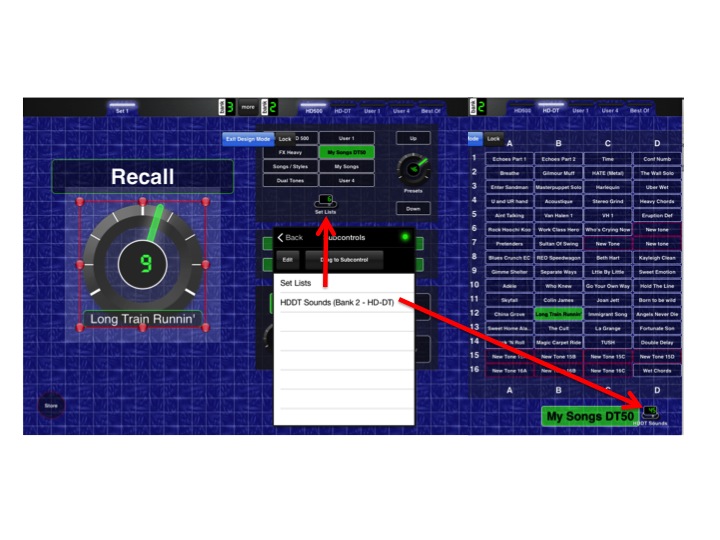

Note that "STORE" button (bottom left) has been intentionally designed a lot smaller than "RECALL" to make sure not to accidentally overwrite sounds sequence.
Now enjoy controlling LINE6 HD500 with MIDI Designer and your iPad:
Note that this layout contains DT50 Amplifiers pages (on BANK 1), POD HD500 (on BANK 2) and SETLIST (on page 3). If you are not using DT50 amplifier with your HD500, you can remove the DT50 pages. Keeping them does not alter MIDI Designer performance.
